SMS · SERVER MANAGEMENT SYSTEM

Server Manager

Every company server—
monitor it in real time and respond before failure.

Connect server assets, CPU, memory, disk and network status, critical processes and incident events in one web management screen.

Simplify server operations with one screen.

View server status and asset information on the web in real time without repeatedly checking terminals and consoles, and notify administrators as soon as a failure occurs.

  • Real-time resource status
  • Process monitoring
  • Server asset management
  • Schedule and notification management
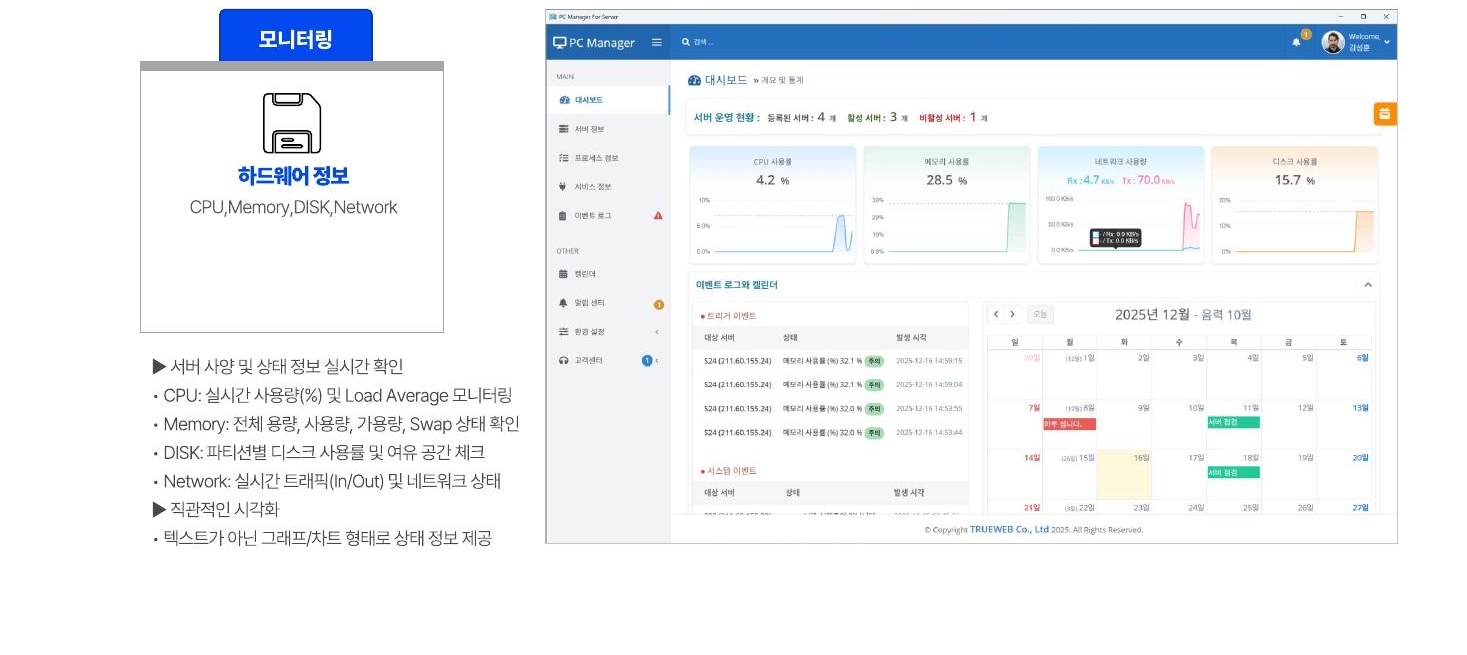
Server Manager screen showing CPU, memory, disk and network status
LIVE DASHBOARD The current state of critical resources,
shown in graphs and charts.

Access server information collected by the Agent on the web, anytime and anywhere.

Check the server's current status in real time.

Collect key CPU, memory, disk and network metrics and present them intuitively in graphs and charts rather than text.

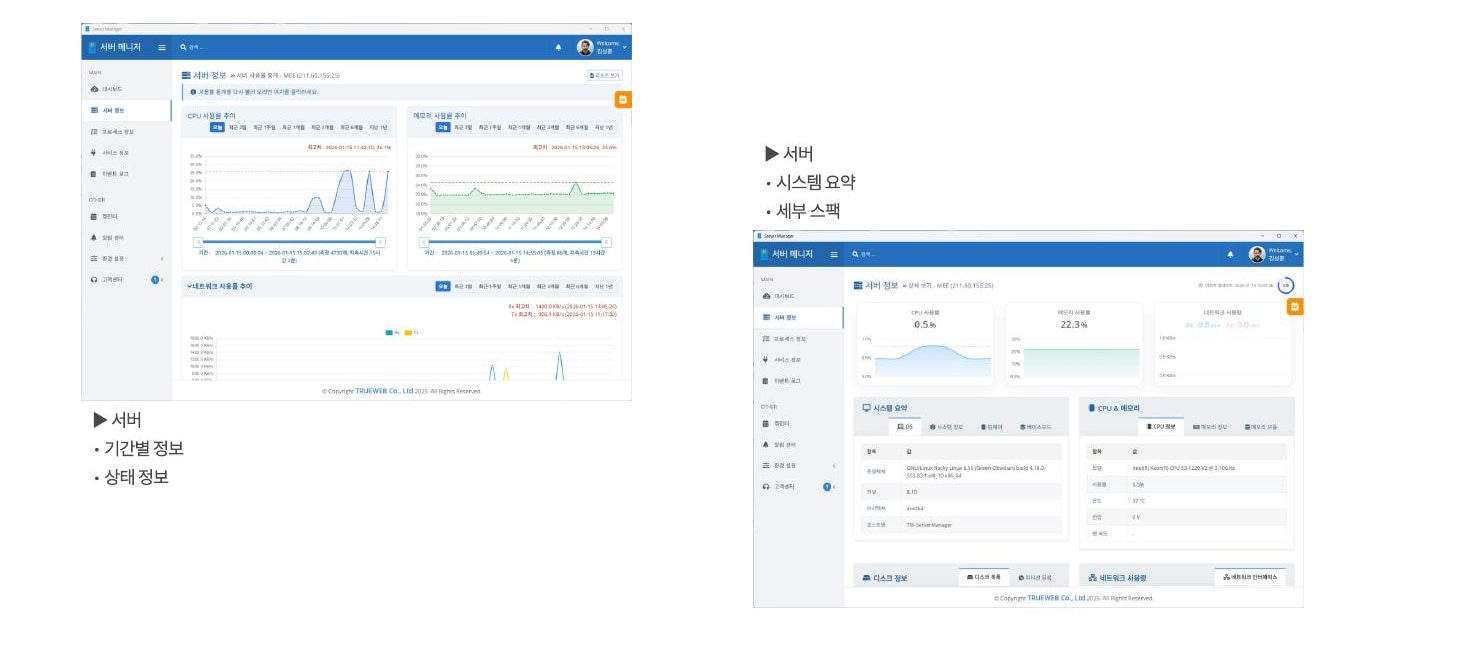
Server Manager screen showing real-time server resources in graphs and charts
MONITORING 01

Resource monitoring

See server specifications and current status on one screen and identify changes over time and signs of resource shortages.

  • View real-time status across all servers
  • Graph- and chart-based visualization
  • CPU utilization · Load Average
  • Memory and Swap status
  • Disk utilization by partition
  • Network In/Out traffic
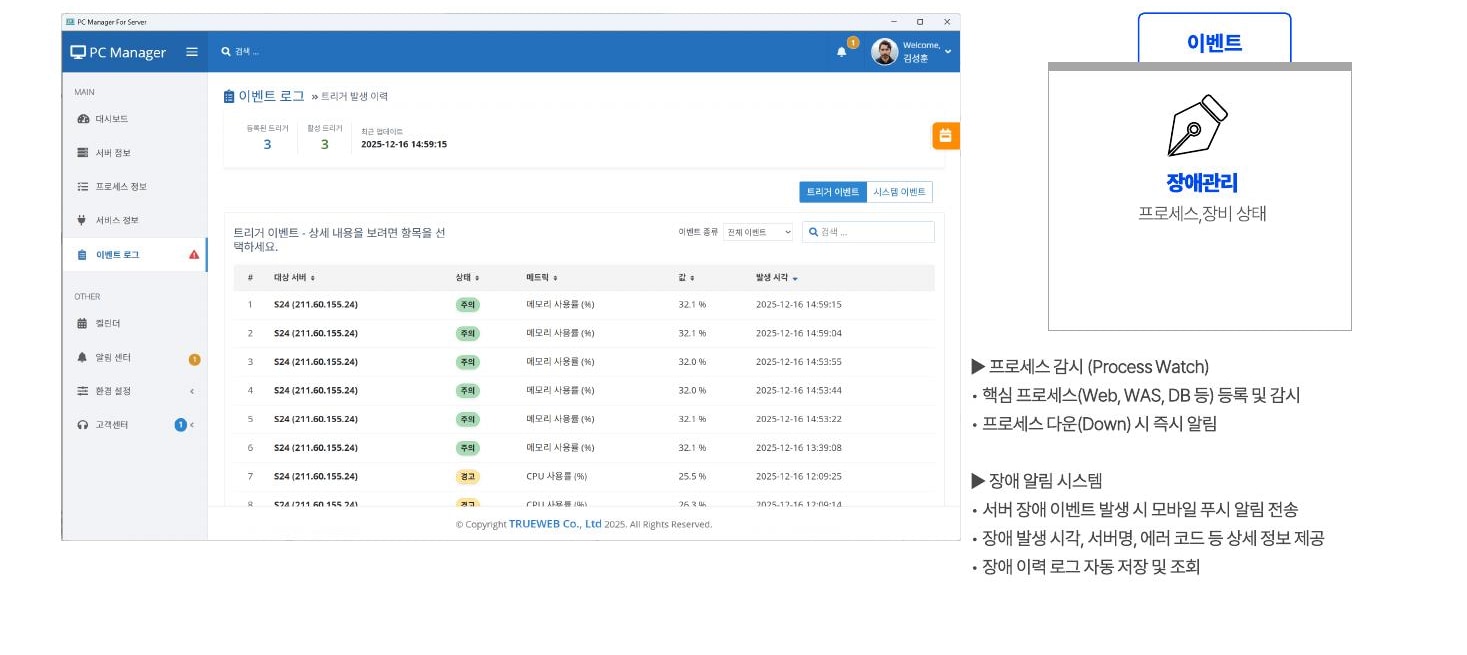
Server Manager screen managing critical processes and incident events
MONITORING 02

Process and incident events

Monitor critical processes such as Web, WAS and DB, and immediately notify administrators if they stop or a server failure occurs.

  • Monitoring policies for Web, WAS and DB
  • View incident-event graphs and statistics
  • Register and monitor critical processes
  • Process-down alerts
  • Provide detailed failure information
  • Automatically save event history

Manage each server's different information using consistent standards.

Link basic information, hardware specifications and resource status over time for each server to manage current asset status and history together.

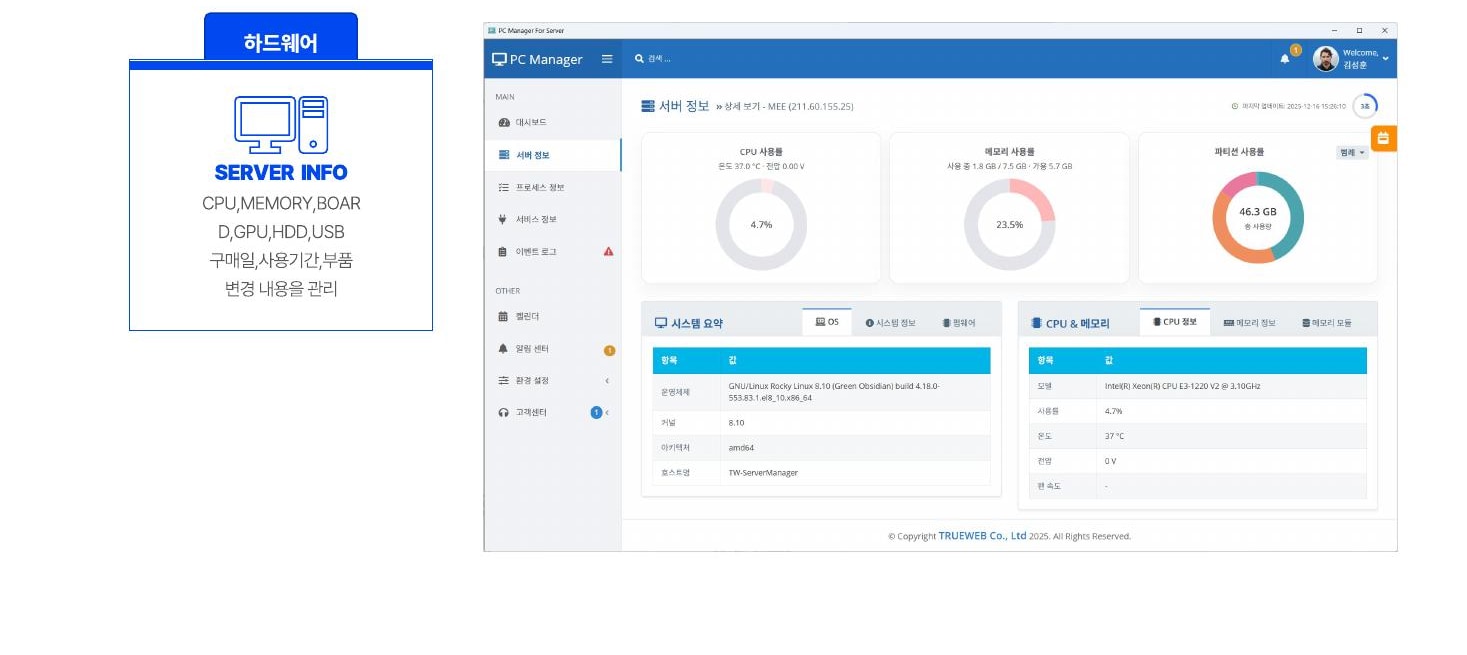
Screen showing server hardware specifications and asset status
01

Hardware assets

Manage CPU, memory, motherboard, GPU and HDD information along with purchase dates, usage periods and component changes.

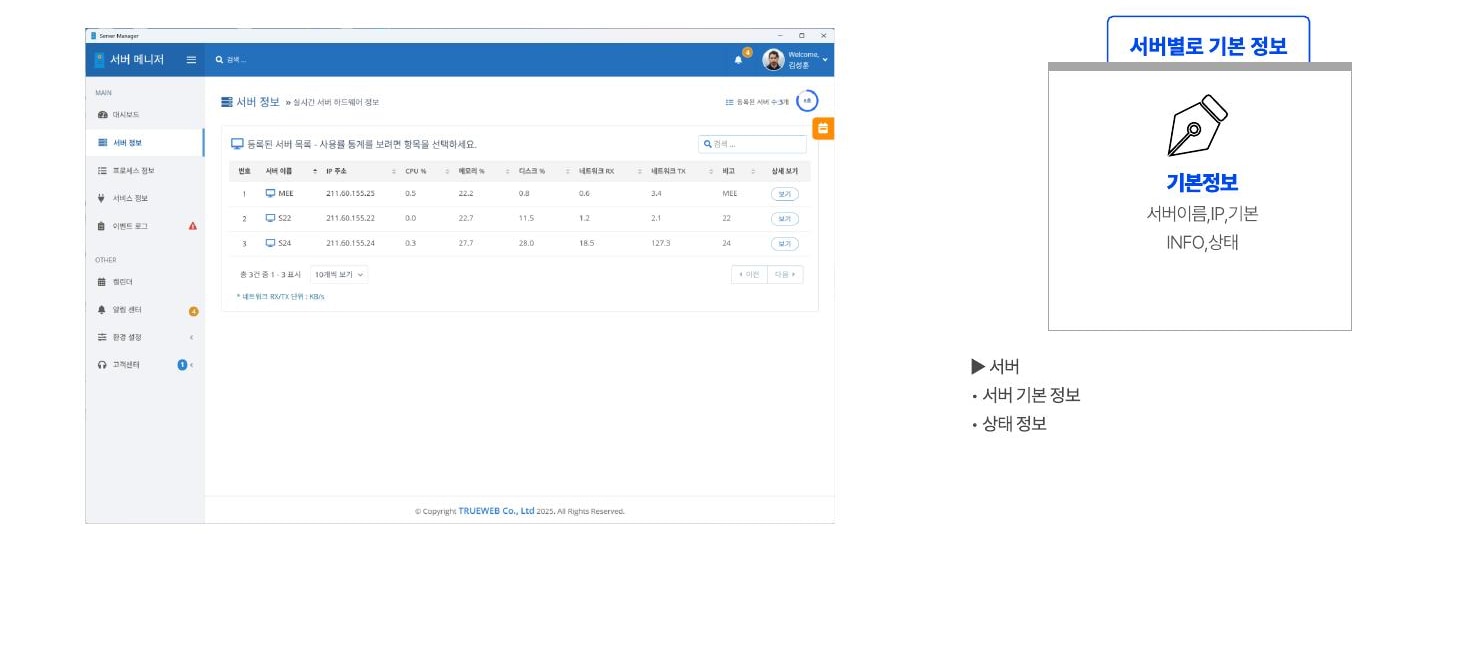
Individual server list showing server names, IP addresses and status
02

Basic server information

Quickly check server names, IP addresses, basic information and current status in the server list.

Server details screen showing the system summary, detailed specifications and status over time
03

Server details

Provide a system summary, detailed specifications and resource graphs over time on each server's screen.

Simply install the Agent
and start monitoring.

Install the Java Agent on a Linux server and the Monitoring Server collects real-time data, while administrators view status and events through the web interface.

Linux AgentOutbound communicationMonitoring ServerWeb Admin
01Target ServerLinux · Java Agent02Secure OutboundMinimize firewall configuration03Monitoring ServerReal-time collection · Status analysis04Web AdminWeb monitoring · Event review

Detect warning signs quickly. Define alert criteria precisely.

Set resource thresholds for each server, and send the server name, event time and error details to administrators when a failure occurs.

01CPU

Tiered utilization and Load Average alerts

02MEM

Set usage, available capacity and Swap thresholds

03DISK

Partition usage and free-space warnings

04NET

Detect changes in traffic and network status

Set server operating standards in one place.

Manage servers, web services, user permissions, notifications, schedules and monitoring items together in one administrator screen.

Server managementRegister server information and set hardware and process operating standards
Web service managementRegister websites and services to monitor
Alert criteriaSet CPU, MEM, DISK and NETWORK thresholds and tiered alerts
Users and permissionsAdd administrator users and manage access scope by role
Schedules and calendarSet inspection, backup and security patch schedules and advance notifications
Monitoring settingsConfigure collection items and detailed monitoring policies for each server

Inspection and backup schedules,
alongside server information.

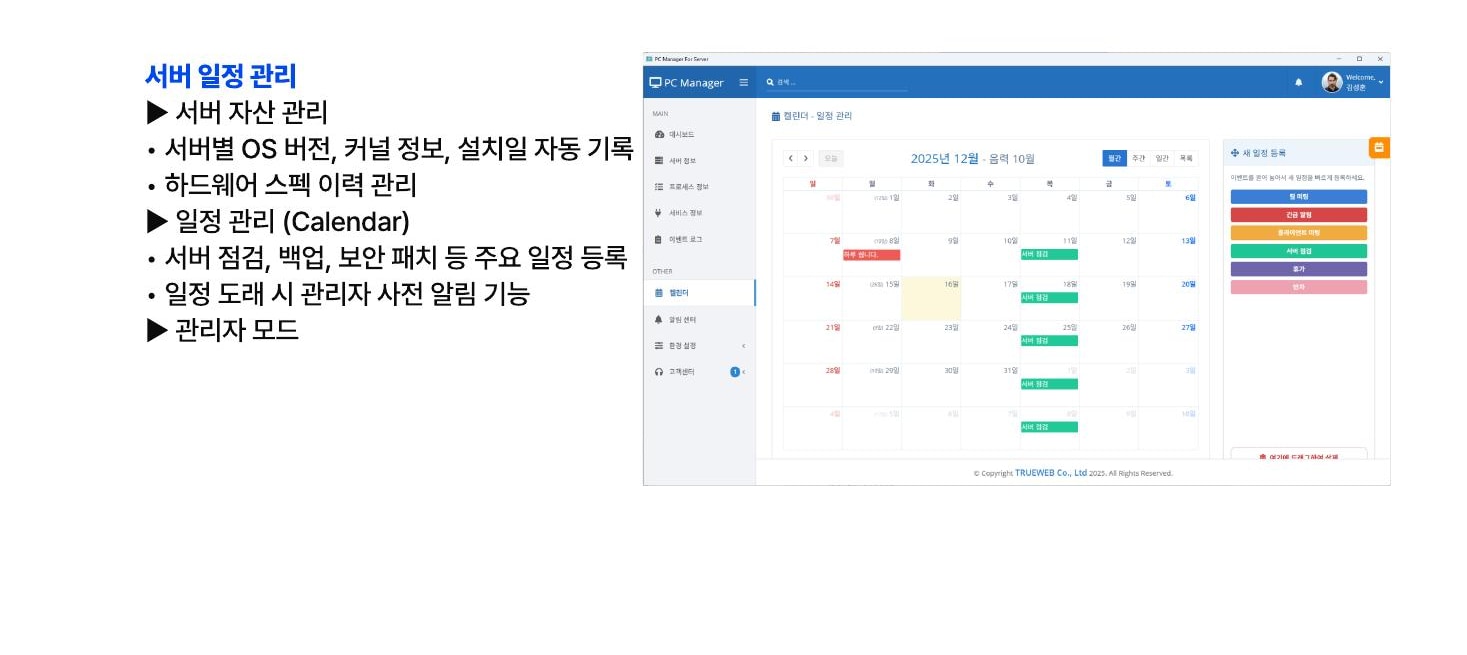
Manage OS, kernel, installation information and hardware history for each server, and register inspection, backup and security patch schedules in the calendar.

  • Manage server assets and operating schedules together
  • Configure schedule policies in administrator mode
  • Automatically record OS version, kernel and installation date
  • Hardware specification history
  • Manage inspection, backup and patch schedules
  • Notify administrators before scheduled events
Calendar screen for managing server inspections, backups and security patch schedules

Automate 24-hour monitoring so operators can focus on important decisions.

01

Prevent interruptions

Capture early warning signs to reduce the risk of service interruption

02

Immediate alerts

Deliver server status to PCs and the administrator screen in real time

03

Automated inspections

Automate repetitive status checks and inspections

04

Operational visibility

View resource changes and per-server status in graphs

05

Reduce response time

Quickly understand process and incident information

06

History management

Continuously accumulate incident, asset and schedule information

Ensure stability

  • Establish uninterrupted server monitoring 24 hours a day, 365 days a year
  • Prevent service interruption with early failure warnings

Increase work efficiency

  • Make operations easier with mobile monitoring without time or location constraints
  • Save operational resources by automating repetitive inspections

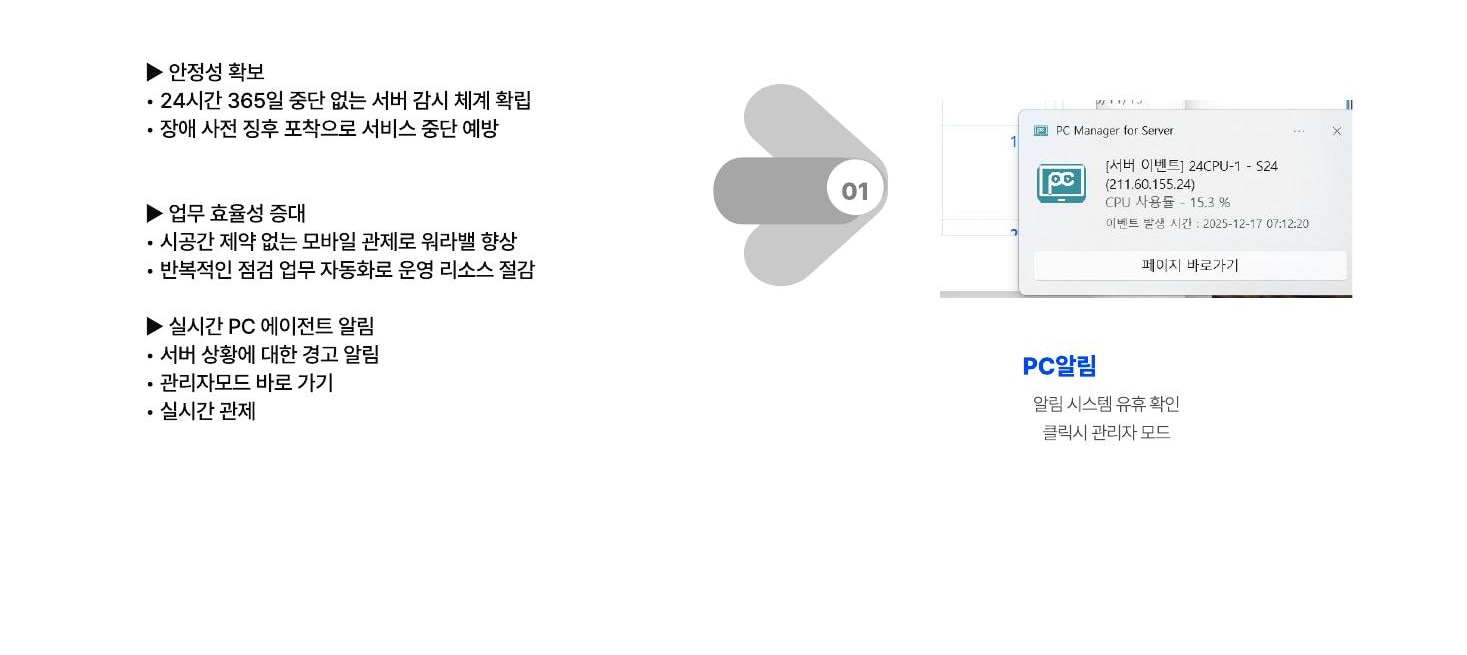
Real-time PC Agent alerts

  • Server status warning alerts
  • Go to administrator mode
  • Real-time monitoring
Example of a real-time Server Manager PC alert
REAL-TIME ALERT Keep operators informed of server status
with immediate notifications.

Open the administrator screen from an alert to check detailed status and history.

Agent to Web
simple monitoring

Reduce complex firewall configuration and use outbound communication to connect server status to the central management screen.

TARGET SERVERLinux · Java AgentInstall the Agent on the server to be monitored
MONITORING & ADMINData Collector · WebReal-time collection and analysis · Administrator web interface

COREMONIT SERVER MANAGER

Don't wait for a server failure—
check early and respond.

Product adoption inquiries